Enterprise: Blip Diffusion Endpoint
Overview
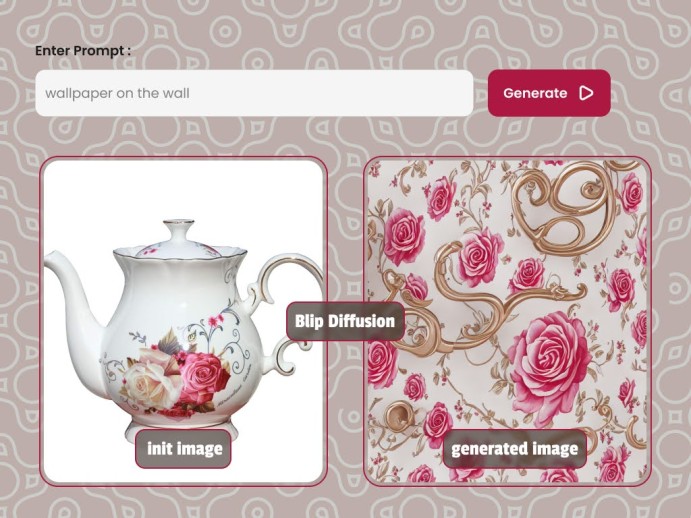
This endpoint allow you to perform blip diffusion on image passed. It works best for object
caution
Make sure you add your s3 details for image_editing server, so you can receive image generated in your bucket.
Images generated without s3 details being added will be delete after 24hours
Request
--request POST 'https://modelslab.com/api/v1/enterprise/image_editing/blip_diffusion' \
Make a POST request to https://modelslab.com/api/v1/enterprise/image_editing/blip_diffusion endpoint and pass the required parameters as a request body to the endpoint.
Body Attributes
| Parameter | Description |
|---|---|
| key | Your API Key used for request authorization |
| prompt | Text prompt with description of the things you want in the image to be generated |
| negative_prompt | Items you don't want in the image |
| task | task to execute. It accept zeroshot, controlnet_generation and controlnet_scribble_generation. Default is "zeroshot |
| condition_image | Required when task is zeroshot |
| condition_subject | Required when task is zeroshot . It is the subject from the condition image |
| target_subject | Object to expected from the result |
| style_subject | It is the subject from style image. Required when task is controlnet_generation or controlnet_scribble_generation |
| controlnet_condition_image | Image URL of the controlnet_condition_image image. Used when tasks is controlnet_generation or controlnet_scribble_generation. For the controlnet_scribble_generation task, we pass in the canny image url instead of just the image. |
| width | Max Height: Width: 512 x 512 |
| height | Max Height: Height: 512 x 512 |
| guidance_scale | Optional. Scale for classifier-free guidance (minimum: 1; maximum: 20). Default is 8 |
| steps | Number of denoising steps (minimum: 1; maximum: 50) Default is 20 |
| seed | Seed is used to reproduce results, same seed will give you same image in return again. Pass null for a random number. |
| webhook | Set an URL to get a POST API call once the image generation is complete. |
| track_id | This ID is returned in the response to the webhook API call. This will be used to identify the webhook request. |
Example
Body
When task is zeroshot, the request will look like so;
Body
{
    "key":"",
    "seed":88888,
    "task":"zeroshot",
    "prompt":"on a marble table",
    "condition_image":"https://m.media-amazon.com/images/I/61qEOpxc1WL.jpg",
    "condition_subject":"teapot",
    "target_subject":"school bag",
    "guidance_scale":7.5,
    "steps":35,
    "height":512,
    "width":512,
    "webhook": null,
    "track_id": null
}
When task is controlnet_generation, the request will look like so
Body
{
    "key":"",
    "seed":88888,
    "task":"controlnet_generation",
    "prompt":"on a marble table",
    "style_image":"https://m.media-amazon.com/images/I/61qEOpxc1WL.jpg",
    "controlnet_condition_image":"https://m.media-amazon.com/images/I/81ELJHbkafL._AC_SX569_.jpg",
    "style_subject":"teapot",
    "target_subject":"cup",
    "guidance_scale":10,
    "steps":35,
    "height":512,
    "width":512,
    "webhook": null,
    "track_id": null
}
When task is controlnet_scribble_generation, the request will look like so
Body
{
    "key":"",
    "seed":88888,
    "task":"controlnet_generation",
    "prompt":"on a marble table",
    "style_image":"//huggingface.co/datasets/ayushtues/blipdiffusion_images/resolve/main/flower.jpg",
    "controlnet_condition_image":"https://huggingface.co/lllyasviel/sd-controlnet-scribble/resolve/main/images/bag.png",
    "style_subject":"flower",
    "target_subject":"bag",
    "guidance_scale":10,
    "steps":35,
    "height":512,
    "width":512,
    "webhook": null,
    "track_id": null
}
Request
- JS
- PHP
- NODE
- PYTHON
- JAVA
var myHeaders = new Headers();
myHeaders.append("Content-Type", "application/json");

var raw = JSON.stringify({
    "key":"",
    "seed":88888,
    "task":"zeroshot",
    "prompt":"on a marble table",
    "condition_image":"https://m.media-amazon.com/images/I/61qEOpxc1WL.jpg",
    "condition_subject":"teapot",
    "target_subject":"school bag",
    "guidance_scale":7.5,
    "steps":35,
    "height":512,
    "width":512,
    "webhook": null,
    "track_id": null
});

var requestOptions = {
  method: 'POST',
  headers: myHeaders,
  body: raw,
  redirect: 'follow'
};

fetch("https://modelslab.com/api/v1/enterprise/image_editing/blip_diffusion", requestOptions)
  .then(response => response.text())
  .then(result => console.log(result))
  .catch(error => console.log('error', error));
<?php

$payload = [
    "key" => "",
    "seed" => 88888,
    "task" => "zeroshot",
    "prompt" => "on a marble table",
    "condition_image" => "https://m.media-amazon.com/images/I/61qEOpxc1WL.jpg",
    "condition_subject" => "teapot",
    "target_subject" => "school bag",
    "guidance_scale"=> 7.5,
    "steps"=>35,
    "height"=>512,
    "width" => 512,
    "webhook" => null,
    "track_id" => null
];

$curl = curl_init();

curl_setopt_array($curl, array(
  CURLOPT_URL => 'https://modelslab.com/api/v1/enterprise/image_editing/blip_diffusion',
  CURLOPT_RETURNTRANSFER => true,
  CURLOPT_ENCODING => '',
  CURLOPT_MAXREDIRS => 10,
  CURLOPT_TIMEOUT => 0,
  CURLOPT_FOLLOWLOCATION => true,
  CURLOPT_HTTP_VERSION => CURL_HTTP_VERSION_1_1,
  CURLOPT_CUSTOMREQUEST => 'POST',
  CURLOPT_POSTFIELDS => json_encode($payload),
  CURLOPT_HTTPHEADER => array(
    'Content-Type: application/json'
  ),
));

$response = curl_exec($curl);

curl_close($curl);
echo $response;
var request = require('request');
var options = {
  'method': 'POST',
  'url': 'https://modelslab.com/api/v1/enterprise/image_editing/blip_diffusion',
  'headers': {
    'Content-Type': 'application/json'
  },
  body: JSON.stringify({
    "key":"",
    "seed":88888,
    "task":"zeroshot",
    "prompt":"on a marble table",
    "condition_image":"https://m.media-amazon.com/images/I/61qEOpxc1WL.jpg",
    "condition_subject":"teapot",
    "target_subject":"school bag",
    "guidance_scale":7.5,
    "steps":35,
    "height":512,
    "width":512,
    "webhook": null,
    "track_id": null
  })
};

request(options, function (error, response) {
  if (error) throw new Error(error);
  console.log(response.body);
});
import requests
import json

url = "https://modelslab.com/api/v1/enterprise/image_editing/blip_diffusion"

payload = json.dumps({
    "key":"",
    "seed":88888,
    "task":"zeroshot",
    "prompt":"on a marble table",
    "condition_image":"https://m.media-amazon.com/images/I/61qEOpxc1WL.jpg",
    "condition_subject":"teapot",
    "target_subject":"school bag",
    "guidance_scale":7.5,
    "steps":35,
    "height":512,
    "width":512,
    "webhook": None,
    "track_id": None
})

headers = {
  'Content-Type': 'application/json'
}

response = requests.request("POST", url, headers=headers, data=payload)

print(response.text)
         OkHttpClient client = new OkHttpClient().newBuilder()
      .build();
    MediaType mediaType = MediaType.parse("application/json");
    RequestBody body = RequestBody.create(mediaType, "{\n    \"key\":\"bXagUMkX2VTOTc1Z2TAoU0Yh39N1TftQ8BmQCQzKM4Ng5G5qmufiCzX6Arnn\",\n    \"seed\":88888,\n    \"task\":\"zeroshot\",\n    \"prompt\":\"on a marble table\",\n    \"condition_image\":\"https://m.media-amazon.com/images/I/61qEOpxc1WL.jpg\",\n    \"condition_subject\":\"teapot\",\n    \"target_subject\":\"shoe\",\n    \"guidance_scale\":7.5,\n    \"steps\":35,\n    \"height\":512,\n    \"width\":512\n}");
    Request request = new Request.Builder()
      .url("https://modelslab.com/api/v1/enterprise/image_editing/blip_diffusion")
      .method("POST", body)
      .addHeader("Content-Type", "application/json")
      .build();
    Response response = client.newCall(request).execute();
Response
Example Response
{
    "status": "success",
    "generationTime": 3.270559072494507,
    "id": 563,
    "output": [
        "https://pub-3626123a908346a7a8be8d9295f44e26.r2.dev/generations/9c1e05cc-16f0-4a11-9900-a6edd56586dd.png.png"
    ],
    "meta": {
        "base64": "no",
        "file_prefix": "9c1e05cc-16f0-4a11-9900-a6edd56586dd.png",
        "guidance_scale": 7.5,
        "height": 512,
        "instant_response": "no",
        "neg_prompt": "over-exposure, under-exposure, saturated, duplicate, out of frame, lowres, cropped, worst quality, low quality, jpeg artifacts, morbid, mutilated, out of frame, ugly, bad anatomy, bad proportions, deformed, blurry, duplicate",
        "num_inference_steps": 35,
        "outdir": "out",
        "prompt": "on a marble table",
        "prompt_reps": 20,
        "prompt_strength": 1,
        "reference_image": "https://m.media-amazon.com/images/I/61qEOpxc1WL.jpg",
        "seed": 88888,
        "source_subject_category": "teapot",
        "sub_task": "zeroshot",
        "target_subject_category": "shoe",
        "temp": "no",
        "width": 512
    }
}